The result first
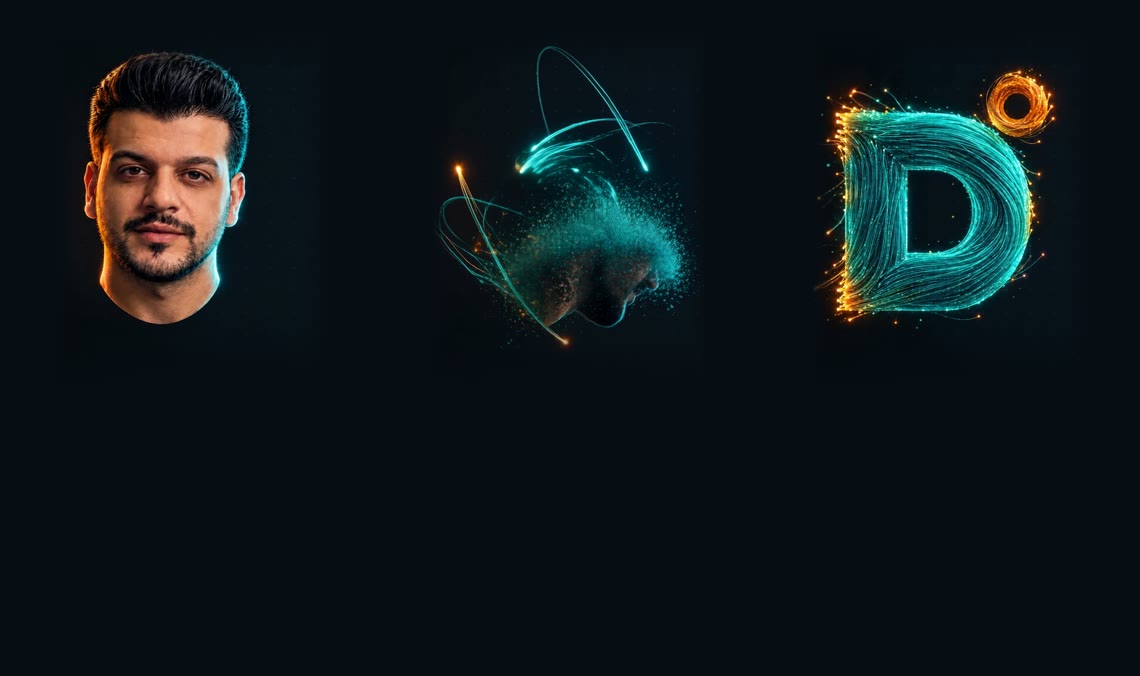
6 seconds of video, 145 frames. On the site it doesn't play as a video — every bit of scroll shows one frame, so the visitor feels like they're the one taking your head apart and building the logo.
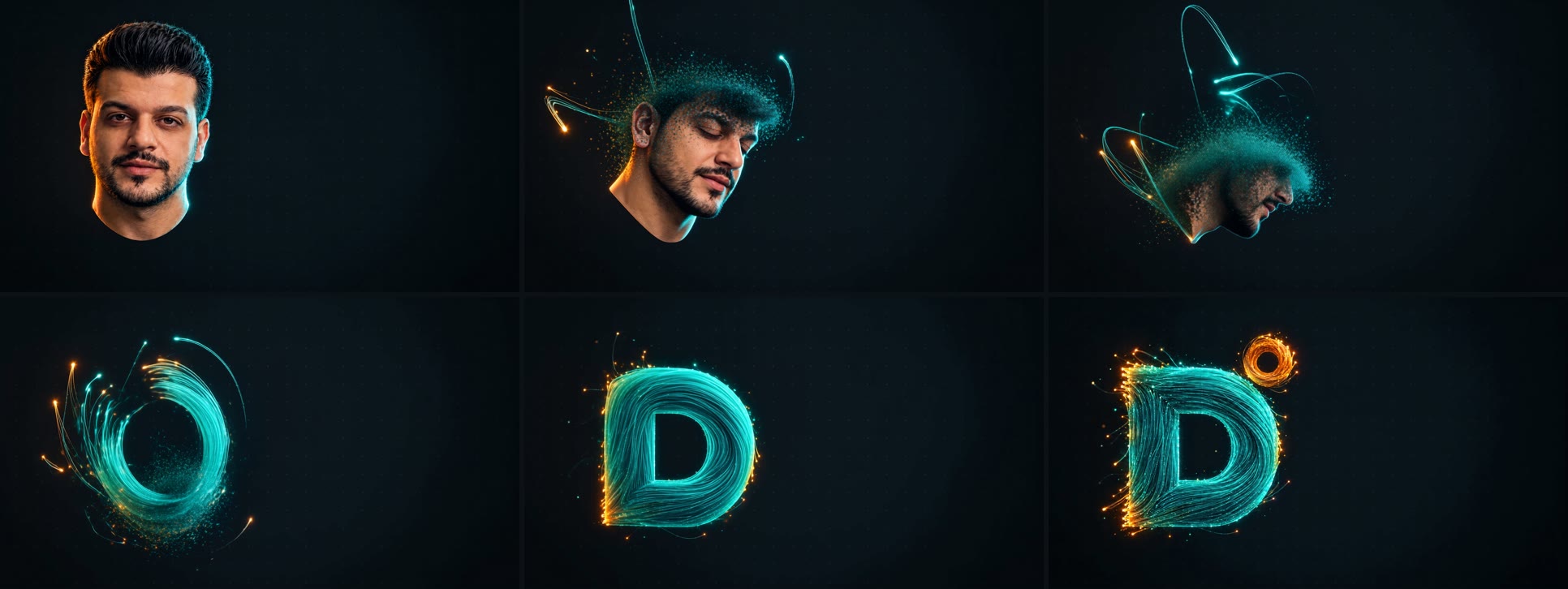
The video here is compressed and muted for display only. See it live on the homepage and scroll.
How the idea works
The idea comes from the trend of 3D websites with a head that comes apart as you scroll. But instead of building it in Three.js with weeks of work, we do it in 4 stages:
What you need before you start
| What | Why |
|---|---|
| A Higgsfield account | It has the image model and the video model (Seedance 2.0) that supports a start and an end frame |
| Claude Code + Higgsfield MCP | Optional, but it saves you a lot — Claude uploads the images, generates, and extracts the frames on its own |
| A clear photo of you | Face-on, good lighting. Two photos are better than one |
| The logo PNG | A reference for the end shape — without it, the model makes up a logo |
| Your brand colors HEX | You'll type them into the prompt exactly. I used #0D1117 for the background, #2DD4BF as primary, #F59E0B as accent |
| ffmpeg | To cut the video into frames |
Connect Higgsfield to Claude Code — one command (the official address from higgsfield.ai/mcp):
claude mcp add --transport http --scope user higgsfield https://mcp.higgsfield.ai/mcp
Install ffmpeg Windows
winget install ffmpeg
macOS
brew install ffmpeg
If you don't have a site with a scroll hero yet, start with the cinematic portfolio guide — this guide builds on it.
80% of the result's quality is decided here. The video itself is the easiest step if both frames are right.
The start frame — your head, in your brand
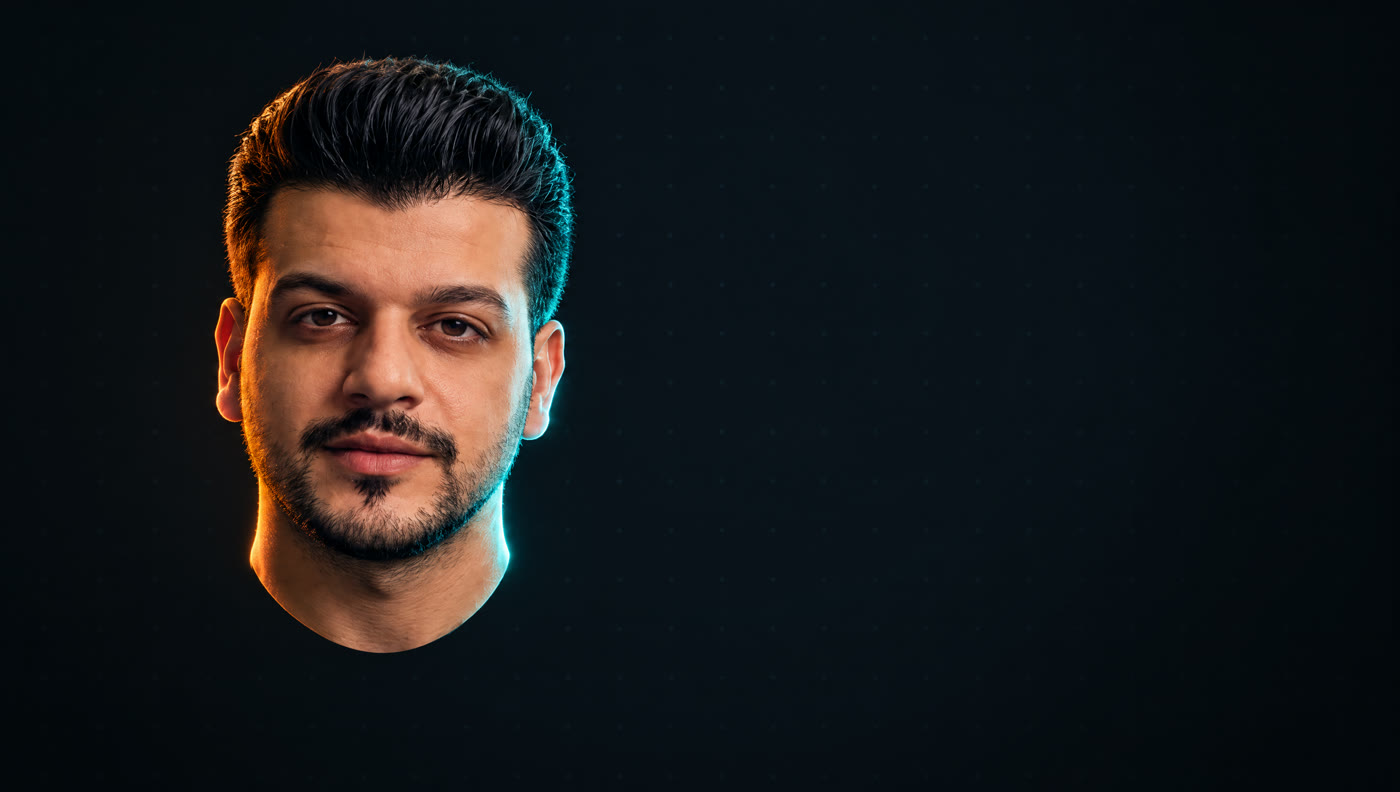
Upload your photo as a reference, and ask the image model (I used gpt_image_2_5, high quality, 2k resolution, 16:9 aspect) for two versions. Swap the HEX colors for your own:
Generate the frames on higgsfield.aiCinematic hyper-realistic 3D digital bust of the exact same man from the reference
photos (same face, same hair, same beard, same skin tone and identity).
HEAD ONLY: a floating disembodied head with a clean sculpted cut just below the jaw
at the upper neck, no shoulders, no clothes, no body. The head is in a slight
three-quarter turn, eyes looking calmly toward the camera, neutral confident
expression, like a premium tech-studio portrait sculpture.
Composition: wide 16:9 frame, the head placed in the LEFT third of the frame,
vertically centered, occupying about 55% of frame height, with generous empty
negative space on the right half for website text.
Background: very dark charcoal navy #0D1117, almost black, with an extremely subtle
faint grid of tiny dim dots fading into darkness toward the edges, soft vignette.
Lighting: moody studio key light on the face, a crisp teal (#2DD4BF) rim light along
one side of the head and jaw, and a warm amber (#F59E0B) rim light on the other side
of the head. Photoreal skin pores, sharp detail, shallow film grain, high-end 3D
render look like a luxury portfolio website hero. No text, no logos, no watermark,
no particles yet.
| The phrase | Why it's there |
|---|---|
| HEAD ONLY | A head on its own breaks apart far more cleanly than a full body in clothes |
| LEFT third | My site is RTL — the text sits on the right, so the head has to leave room for it. If your site is in English, flip it |
| HEX colors | The background has to match your site's background, or the video's “rectangle” will show |
| no particles yet | Without this phrase, some models start the effect right from the start frame |
The end frame — the logo, made of strands
Here's the big mistake everyone makes: they generate the end frame from scratch. Don't. Give the model the start frame itself as the first reference, and the logo as the second — so the camera, the background and the position all stay identical.
Use the first reference image as the exact scene: same camera, same framing, same
dark #0D1117 background with the faint dim dot grid and vignette, same lighting mood.
The human head is now GONE. It has fully transformed into a bold 3D capital letter
"D" matching the second reference logo's D shape (thick geometric D with a rounded
right bowl and rectangular counter), occupying exactly the same position and size
the head occupied (left third of frame, same height).

The D is built entirely from thousands of fine glowing fiber-optic strands and cables
in teal #2DD4BF, tightly bundled and flowing along the curve of the letter like woven
cables, with photoreal 3D depth, soft subsurface glow and tiny specular highlights.
The strand tips at the edges glow warm amber #F59E0B like hot fiber-optic ends. A few
last loose strands and tiny glowing particles are still drifting in and settling into
the letter, subtle motion trails. Above the top-right corner of the D floats a small
glowing amber #F59E0B ring (hollow circle), like the orange dot in the logo, made of
the same fiber strands.

Premium cinematic 3D render, luxury tech portfolio website hero, dark moody lighting,
teal rim light, shallow film grain. Right half of the frame stays empty dark negative
space. No human face, no skin, no hair, no text other than the D shape, no watermark,
no rounded square app-icon background.

Don't have a letter? The same prompt works for any simple logo: swap the description of the D for a description of your logo's shape in clear geometric words (circle, triangle, arrow…). Complex shapes, or ones with long text, don't come out well in strands.
The video — from start to end
The settings that worked for me:
Seedance 2.0 on higgsfield.ai- Model: seedance_2_0 — std mode
- Resolution: 1080p · Duration: 6 seconds · Aspect: 16:9
- Audio: off — it won't play on the site anyway, so why pay for it?
- References: the start frame as start_image, and the end frame as end_image
Locked-off static camera, no camera movement, dark #0D1117 studio background with
faint dot grid stays perfectly still. The floating realistic human head slowly turns
a little to the side, eyes close calmly. Then the skin begins to disintegrate from the
back of the head forward into thousands of tiny glowing teal particles and fine voxel
fragments, like a digital scan dissolving. The particles stretch into long flowing
teal fiber-optic strands with warm amber glowing tips that stream and swirl through
the air in elegant curves. The strands then gather, weave and wrap tightly together
in the same spot, building the shape of a bold 3D letter D made of bundled teal fiber
cables, and a small amber fiber ring forms above its top right corner. Smooth,
continuous, slow, satisfying VFX morph transformation, premium cinematic 3D render,
soft volumetric glow, no cuts, no text, no extra objects.
| The phrase | Why it's there |
|---|---|
| Locked-off static camera | The most important phrase. Any camera movement makes the background “swim” as you scroll, and it looks distracting |
| Order of stages | Turn → breakup → strands → gathering. When you describe the sequence, the model spreads the time across it instead of jumping to the end |
| in the same spot | Stops the strands from building the letter somewhere else in the frame |
| slow, no cuts | The video has to be one continuous shot — any cut shows up as a jump while scrolling |
The video doesn't go in as a <video>. It gets cut into images, and the scroll picks which image to show.
Extracting the frames — desktop and mobile
A) The desktop version — every frame at 1600×900. That's enough even for big screens, because the canvas scales up:
mkdir -p seq/hero/m
ffmpeg -i hero.mp4 -vf "scale=1600:900:flags=lanczos" -q:v 3 seq/hero/frame_%04d.jpg
B) The mobile version — this is where I struggled. A plain center crop cuts off the logo, and a phone screen is narrower than the frame too. The fix: we crop the head area, scale it down, and place it on a background of the same color with soft edges:
ffmpeg -i hero.mp4 -filter_complex "color=c=0x060D13:s=608x1080:r=24[bg];[0]crop=820:1080:200:0,scale=440:580:flags=lanczos,format=rgba,geq=r='r(X,Y)':g='g(X,Y)':b='b(X,Y)':a='255*clip(min(min(Y/80,(H-1-Y)/110),min(X/32,(W-1-X)/32)),0,1)'[fg];[bg][fg]overlay=84:40:shortest=1,format=yuvj420p" -q:v 3 seq/hero/m/frame_%04d.jpg
- crop=820:1080:200:0 — the area that holds the head and the logo in my video. Change the numbers to match where your head sits
- 0x060D13 — the background color. I picked it with the eyedropper from the edge of the video, not from the brand code, because the model shifts the color slightly
- overlay=84:40 — the head at the top of the screen, with the text below it
C) The manifest file — count the frames first:
ls seq/hero/frame_*.jpg | wc -l
Then put the number in seq/hero/manifest.json (and the same file in seq/hero/m/):
{"fps":24,"pattern":"frame_%04d.jpg","count":145}
Hooking it to scroll
A) The HTML — a tall section (280vh) with a sticky, screen-height stage inside it. The section's height is what sets how “slow” the transformation feels:
<section class="hero-wrap">
  <div class="pin-stage">
    <canvas id="hero-seq"></canvas>
    <div class="hero-type">
      <h1>Your name here</h1>
      <p>A one-line intro</p>
    </div>
  </div>
</section>
B) The CSS — note the last part: the text sits to the right on desktop, and under the head on mobile:
.hero-wrap { height: 280vh; }
.pin-stage { position: sticky; top: 0; height: 100svh; overflow: hidden; }
#hero-seq  { position: absolute; inset: 0; width: 100%; height: 100%; display: block; }
.hero-type { position: absolute; inset: 0; display: grid; place-items: center; z-index: 5; }

/* desktop: the head lives in the left third, so the copy takes the empty side */
@media (min-width: 901px) {
  .hero-type { justify-items: start; text-align: start; padding-inline: 7vw 0; }
  .hero-type h1 { font-size: clamp(64px, 9vw, 150px); }
}

/* phones: the head sits in the top half of the frame, copy below it */
@media (max-width: 900px) {
  .hero-type { align-items: end; padding-bottom: 23svh; }
}
C) The JavaScript — loads the frames and draws the one that matches the scroll position:
const cv = document.getElementById('hero-seq');
const ctx = cv.getContext('2d');
const base = matchMedia('(max-width: 820px)').matches ? 'seq/hero/m/' : 'seq/hero/';
const frames = [];

fetch(base + 'manifest.json').then(r => r.json()).then(({ count, pattern }) => {
  for (let i = 1; i <= count; i++) {
    const img = new Image();
    img.src = base + pattern.replace('%04d', String(i).padStart(4, '0'));
    frames.push(img);
  }
  frames[0].onload = () => { size(); render(); };
});

function size() {
  const dpr = Math.min(devicePixelRatio || 1, 2);
  cv.width = cv.clientWidth * dpr;
  cv.height = cv.clientHeight * dpr;
}

function render() {
  const wrap = cv.closest('.hero-wrap');
  const r = wrap.getBoundingClientRect();
  const p = Math.min(1, Math.max(0, -r.top / (r.height - innerHeight)));
  const img = frames[Math.round(p * (frames.length - 1))];
  if (!img || !img.complete) return;
  // "cover" fit, like background-size: cover
  const s = Math.max(cv.width / img.naturalWidth, cv.height / img.naturalHeight);
  const w = img.naturalWidth * s, h = img.naturalHeight * s;
  ctx.drawImage(img, (cv.width - w) / 2, (cv.height - h) / 2, w, h);
}

addEventListener('scroll', () => requestAnimationFrame(render), { passive: true });
addEventListener('resize', () => { size(); render(); });


Mistakes I made — save yourself the trouble
1) The text landed on my face. The first time I wired up the frames, the big name sat dead center — right over my eyes:

- Plan where the text goes before you generate. That's why the start prompt includes “LEFT third” and “empty right half”. Forget them and you'll have to redo everything.
- Mobile isn't a center crop. I tried a plain crop first — the orange ring got cut off. On top of that, the canvas uses a cover fit, so a 390px screen crops even more than the frame itself.
- Don't use a blurred background on mobile. I tried blur instead of a solid color — visible lines showed up above and below the frame. A solid color with soft edges is much cleaner.
- Watch the size. The new frames came out at ~20MB (the old ones were 15MB) because the strands carry a lot of detail. If the site gets slow, drop the quality to -q:v 5.
- Test on a real phone or in an iframe. Headless Chrome won't go below ~500px wide — so a “mobile” screenshot from it is lying to you.
- Keep a copy of the old frames. Before you overwrite them — or make sure they're in git.
One prompt for Claude Code — it does it all
If Higgsfield MCP is connected, give Claude Code this prompt from inside your site's folder. Replace whatever's in brackets:
I want a scroll-scrubbed hero on my site: my realistic head dissolves into glowing
fiber strands that rebuild my logo, driven by scroll. Hero section only, do not touch
the rest of the site.

Inputs:
- My photo: [path/to/my-photo.png]
- My logo: [path/to/logo.png]
- Brand colors: background [#0D1117], primary [#2DD4BF], accent [#F59E0B]
- Site direction: [RTL] (text goes on the [right], so the head goes on the [left])

Work in this order and STOP for my approval after steps 1 and 2:
1. Show me your plan first. Then generate 2 START frames with Higgsfield
   (16:9, 2k): head only, clean neck cut, placed in the [left] third, empty space for
   text, background exactly my background color, rim lights in my brand colors.
2. Using the chosen start frame AS A REFERENCE plus my logo, generate 2 END frames:
   same camera, same background, the logo built from fiber-optic strands in my
   primary color with accent-colored tips, occupying the same position and size as
   the head. Recommend the one whose position matches best.
3. Generate the video with seedance_2_0 (std, 1080p, 6s, 16:9, no audio) using
   start_image and end_image, locked-off static camera, one continuous shot.
   Decline any preset suggestion.
4. Back up the existing hero frames, then extract desktop frames (1600x900) and
   mobile frames (608x1080: crop around the head, scale down, place in the top part
   over a solid color sampled from the video edge, feathered edges so the logo is
   never cut). Update manifest.json for both.
5. Check the hero text does not overlap the head on desktop and on a 390px phone
   (use an iframe for the phone test). Fix with CSS only.
6. Report what changed, total size of the frames, and anything you did not verify.
Why not just drop in the video as a <video> and control currentTime?
My face changed in the video and doesn't look like me anymore
The logo came out distorted at the end
How long should the video be?
My site is in English (LTR) — what do I change?
The prompts above are ready to copy — start with the start frame, and don't move on to the video until both frames match in position and size.
Start here — higgsfield.aiGood luck 👊
If you try it on your own site, send me the link — I'd love to see how people's logos turn out.