You take an existing video and swap out the people in it, while the motion, camera and background stay exactly as they are.
The result first — before and after
The exact same scene: same motion, same camera, same background, same timing. The only thing that changed is the people.
The videos here are compressed and muted for display only — the original is higher resolution.
What exactly Genjutsu does
Genjutsu takes an existing video and replaces the people or objects in it with characters from reference images you give it — while keeping the motion, camera and background exactly as they are.
In other words, you're not generating a new video from scratch. You're taking a ready-made scene and swapping what's in it. And that's exactly why it looks real: the motion, lighting and choreography are all original.
- Mode used: object/character replacement — hf_mult_replace_object
- Resolution: 480p, 720p or 1080p — I worked at the highest available
What you need before you start
A) One source video — pick a scene with:
- Clear, continuous motion (walking, a head turn, a moving crowd)
- A static camera or simple camera movement — the less chaotic the camera, the less the faces get distorted
- Characters that are visible and clear, not silhouettes or too far away
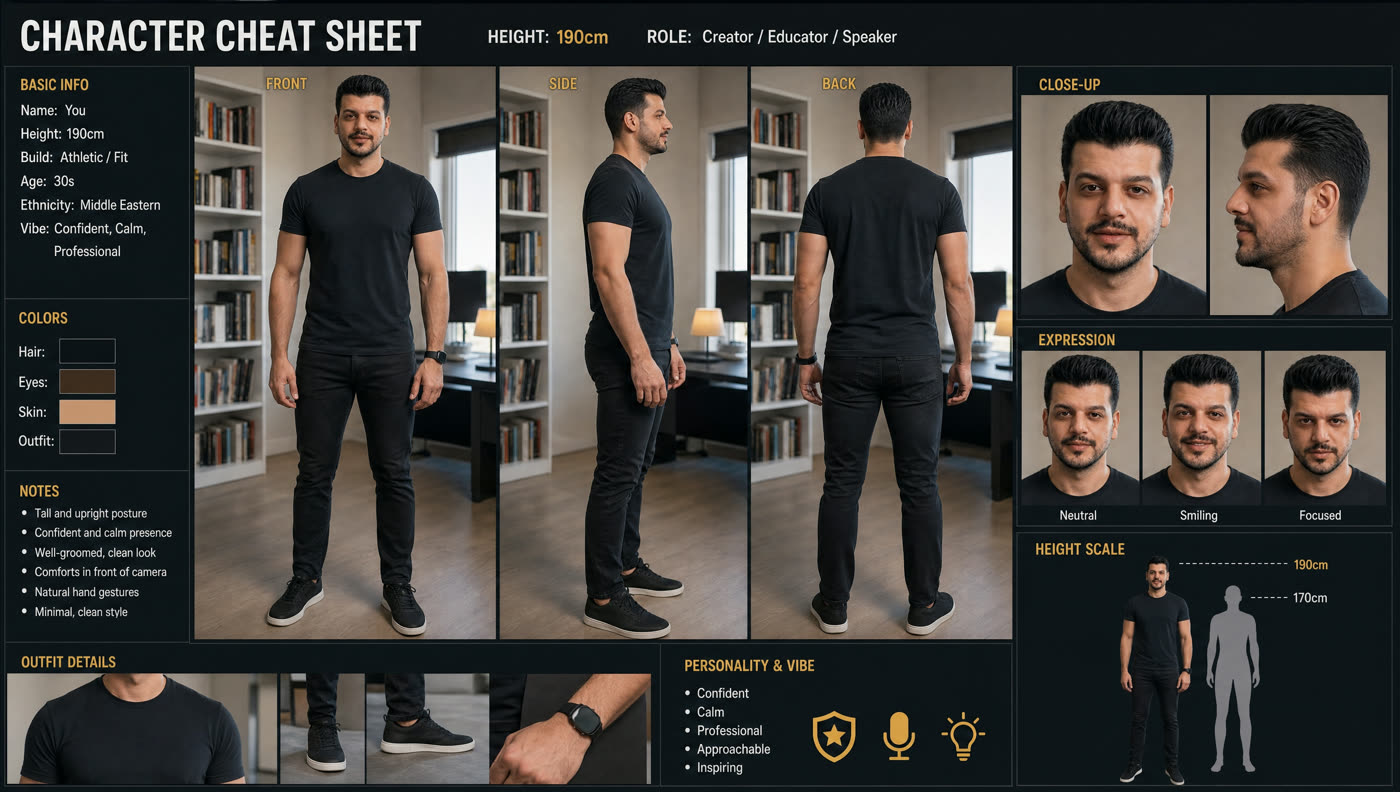
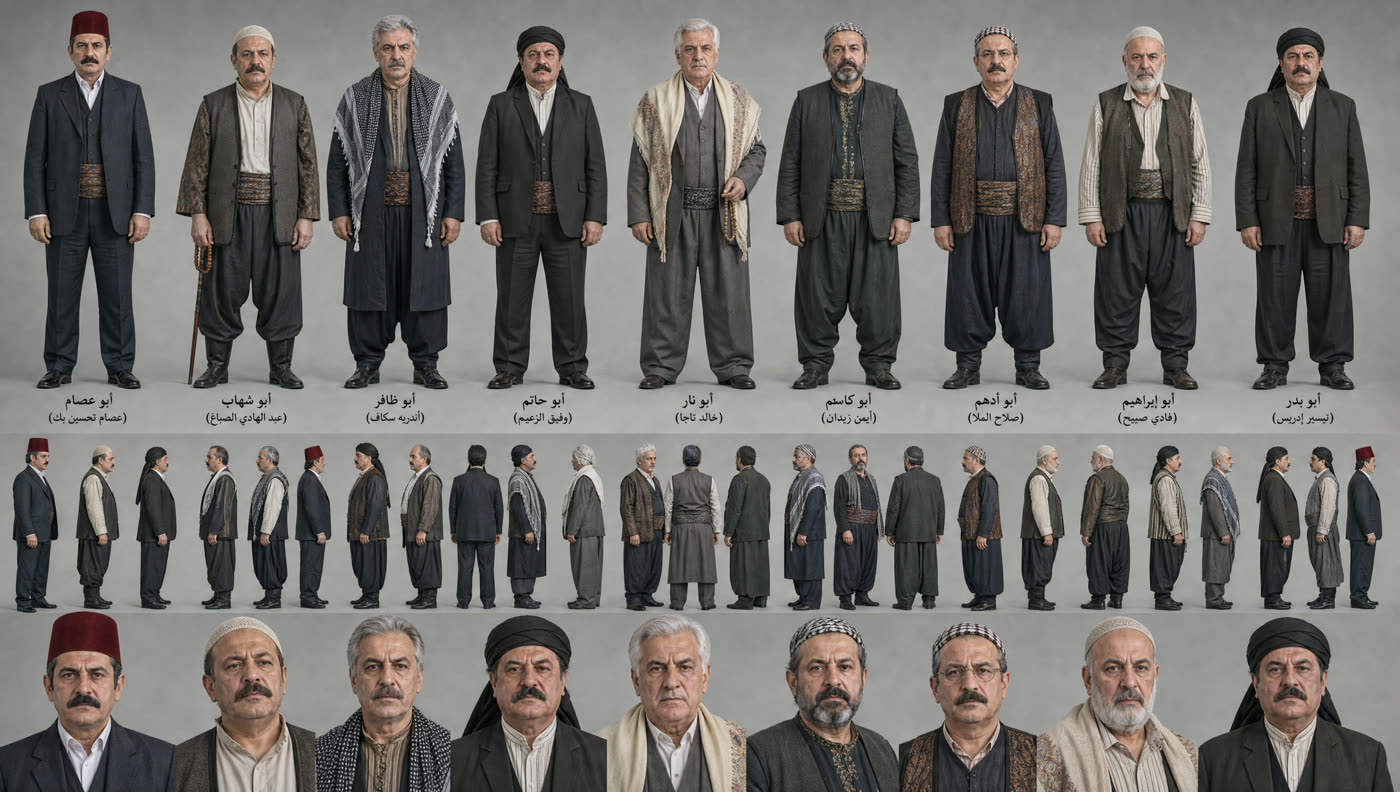
B) Reference images of the characters — this is where most people go wrong. Don't upload a regular selfie. What worked for me was two things:
The full prompt
Here's the prompt word for word. Only change the image numbers if your order is different:
CHARACTER REPLACEMENT TASK

1. CENTER CHARACTER: Replace ONLY the single main character standing in the exact
center of the group with the character from @[Image 1](image_1). The center position,
body placement, scale, pose, movement, and screen position must remain consistent
with the original video.

2. SURROUNDING CHARACTERS: Replace EVERY OTHER PERSON surrounding the center
character with the character from @[Image 2](image_2). This includes ALL visible
people around the center character: front row, left and right sides, middle rows,
and background. Do NOT leave any of the original surrounding people unchanged.
Every surrounding person becomes the same @[Image 2](image_2) character, repeated
as identical copies.

3. IDENTITY LOCK: Keep each replacement character's face, hairstyle, skin tone, body
proportions, outfit, and color palette exactly as shown in the reference images, in
every single frame. No morphing, no identity drift, no blending between image_1 and
image_2.

4. MOTION AND TIMING: Preserve the original choreography frame by frame. Each
replaced character follows the exact same body movement, limb motion, head turn,
facing direction, walking speed, and timing as the original person they replace.
Do not add, remove, or re-time any motion.

5. CAMERA AND FRAMING: Keep the original camera angle, camera movement, focal
length, depth of field, and shot duration unchanged. Do not re-frame, crop, zoom,
or stabilize.

6. ENVIRONMENT: Keep the background, set, props, floor, and all non-human elements
100% identical to the original video. Only the people are replaced.

7. LIGHTING INTEGRATION: Match the original lighting direction, intensity, color
temperature, shadows, and reflections onto the new characters. Contact shadows and
ground contact must stay physically correct, so the characters look natively filmed
in the scene, not pasted on.

8. SCALE AND DEPTH: Respect the original perspective. Characters further from camera
stay smaller, and the occlusion order stays the same. Nobody floats, overlaps
incorrectly, or changes height relative to the original person.

AVOID: extra people added, people removed, duplicated or missing limbs, warped faces,
flickering identity, style change, cartoon or filter look, watermark, text overlay,
background alteration, slow motion or speed ramp.

OUTPUT: same resolution, same aspect ratio, same frame rate, same length as the source.
Why the prompt is written this way — the most important part
Every clause is there because it prevents a specific problem. Remove a clause and its problem comes right back:
| Clause | The problem it prevents |
|---|---|
| 1 + 2 Separating the center from the surroundings | Without this split, the model puts your character on everyone or mixes them up |
| 3 IDENTITY LOCK | Faces change and flicker between frames — the most annoying problem of all |
| 4 MOTION AND TIMING | The model tends to add motion of its own or change the rhythm |
| 5 CAMERA AND FRAMING | It reframes the scene or zooms in without you asking |
| 6 ENVIRONMENT | The background or floor changes and gives away that it's AI |
| 7 LIGHTING INTEGRATION | The characters look “pasted” on top of the scene instead of filmed in it |
| 8 SCALE AND DEPTH | People float, or distant ones end up bigger than the ones up close |
| AVOID | The negative list — it heads off the most common distortions before they happen |
| OUTPUT | Stops it from changing the resolution, the length or the fps |
An important warning before you post
Tips that save you attempts
- Start with a short clip. Test on 5–8 seconds before you burn credits on 30 seconds.
- A crowd scene = easier than you'd expect. Distant faces don't need much detail, and the eye is forgiving.
- Very close shots are the hardest. The closer the face, the more any flaw shows.
- Lock the outfit in the prompt. Clothing is what slips and changes between shots more than anything else.
- If something comes out wrong, change just one clause and regenerate — change everything at once and you won't know what fixed it.
Do I have to give it a video, or does it generate from scratch?
Can I replace just one person instead of everyone?
Why does the character's face change halfway through?
What's the best resolution to work at?
The background changed even though I didn't ask for it
The plane scene — and more importantly: why this prompt comes out realistic while others come out “obviously AI”.
What you need — 3 reference images
This video is built on multiple references: you give the model more than one image, each with a specific role, and you call each one in the prompt by its number.
| Reference | What it represents | Why it's essential |
|---|---|---|
| image_1 | Character sheet — the person from multiple angles (front/side/back), close-ups, expressions, all in the same outfit | Without it, the face and outfit change every time the character moves |
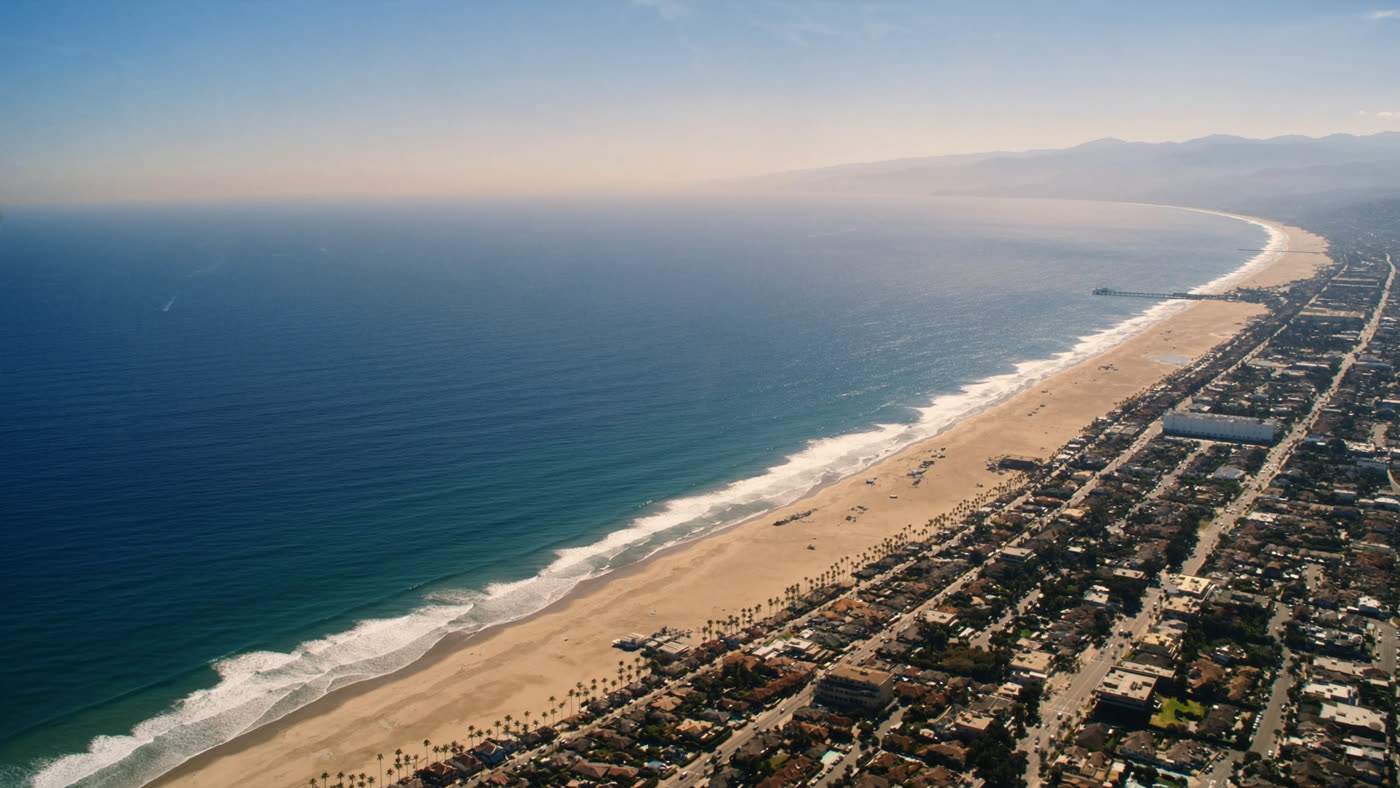
| image_2 | Location — an aerial shot of the place you want to fly over | Locks the shape of the ground, the horizon and the haze, instead of the model inventing a city |
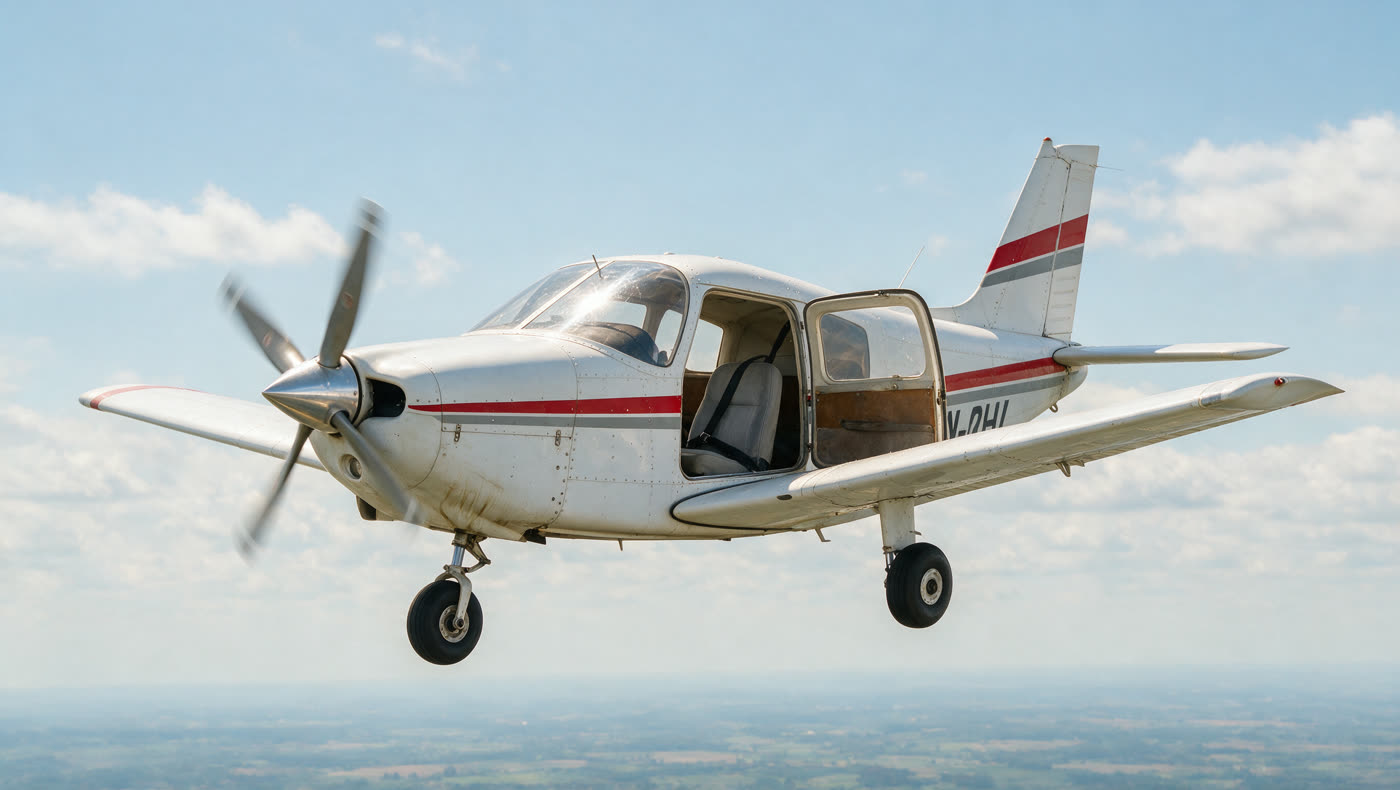
| image_3 | Aircraft — a clear photo of the plane from roughly the same angle | Locks the plane's model, colors and stripes, and stops it from turning into something else halfway through the scene |
The full prompt
Copy it as is, and just change the image numbers to match the order you uploaded them in:
Ultra-realistic amateur iPhone 16 Pro video, filmed handheld by a person in a second
small aircraft, roughly 50 meters away from the subject. Authentic iPhone look at long
range: over-sharpened image, aggressive HDR, wide-angle edge distortion, deep focus,
digital noise in the shadows, faint lens flare and window reflection, heavy
rolling-shutter jello, visible heat shimmer and haze between the camera and the plane.

MOTION — CRITICAL: both aircraft are moving forward fast through the air. The subject
plane is NEVER static in frame. It drifts inside the shot — pulling ahead toward the
front of the frame, the operator losing it and panning to recover, the plane sliding
back toward center. It bobs and dips a few meters in the turbulent air, rolling slightly
left and right. The gap between the planes visibly breathes, 40 to 60 meters.

PARALLAX — CRITICAL: wisps of thin haze and small cloud fragments whip through the space
between the camera and the plane, streaking past the lens. The city grid directly below
rips past in violent horizontal motion blur. Mid-distance rooftops slide past slower. The
far horizon crawls almost imperceptibly. The propeller is a translucent disc. The airframe
vibrates, the open door judders against the airstream.

ONE CONTINUOUS UNBROKEN TAKE, no cuts, no angle changes. The camera holds a single fixed
side-profile position at roughly 50 meters and never orbits, never switches sides, never
closes the distance — only the zoom changes. Constant handheld shake amplified by distance,
the operator continually correcting and re-centering the fast-moving plane.

AUDIO: roaring wind and engine noise, phone microphone clipping. The voice of the person
filming: first stunned — "oh my god... oh my god!" — then, at the moment of the flip,
erupting into disbelieving laughter and shouting, voice cracking, breath audible over the roar.

AIRCRAFT: <<<image_3>>> take the aircraft exactly as shown in the reference. Single-engine
low-wing light plane, fixed tricycle gear, three-blade propeller blurred into a disc.
Slightly weathered paint, sun glare on the windshield. Flying fast and level at 700 meters.
Nobody else on board — the cabin is empty except for the subject.

LOCATION: <<<image_2>>> take the location exactly as shown in the reference. Racing above
the city at 700 meters. Below: the dense street grid ripping past in motion blur, rooftops
and water towers, cars as tiny streaks. Towers standing up through the haze, water glinting
in the sun. Bright midday sun, clear sky, real urban haze on the horizon.

CHARACTER: <<<image_1>>> the character sheet is the ONLY source of truth. Face, hair, build,
outfit, proportions and colour palette all come from the sheet. Do not invent, describe or
alter any physical detail. Lock the outfit exactly as shown, in every frame and from every
angle, including fully inverted. At this distance the face reads only as a general
impression — silhouette, outfit and posture carry the identity.

0.0–3.0s — WIDE SHOT. The plane sits small in frame, drifting forward and bobbing as the
city tears past beneath it. The right cabin door slams open against the airstream and holds,
juddering. The operator reacts off-camera and re-centers the plane with a small pan.

3.0–6.0s — SLOW ZOOM IN, starting exactly as the subject begins climbing out of the cockpit.
Long uneven pinch-zoom with reframing hesitation and heavy digital-zoom mush — soft, noisy,
smeared. The subject fights the airstream, one hand locked on the door frame, plants both
feet on the wing and rises to standing.

6.0–8.0s — Letting go of the door frame, the subject walks carefully out along the wing
toward the tip, arms slightly out for balance, leaning hard into the wind, each step
deliberate. The clothing hammers and ripples tight against the body in the airstream but
stays exactly as the sheet shows. The subject stops near the wingtip, plants both feet, and
sets up.

8.0–9.5s — The subject launches into a backflip: explosive jump straight up, knees tucking
tight to chest, arms wrapped around the shins, full backward rotation in the air above the
wing, body compact and controlled. Real gymnastic physics, natural arc, wind visibly
dragging mid-rotation. The outfit stays locked exactly as the sheet shows through the entire
rotation. The operator erupts — screaming and laughing in disbelief.

9.5–11.5s — Landing on both feet on the wing. The impact makes the aircraft lurch and wobble,
the wing dipping and the whole airframe shuddering. The subject overbalances backward, arms
flailing wide, genuinely about to fall off — then catches it, drops sharply into a deep
crouch with knees bent low and both hands down on the wing surface, weight recovered. A held
beat of real danger.

11.5–14.0s — SLOW ZOOM OUT begins. Staying low, the subject scrambles back along the wing,
hauls up against the wind and ducks into the cabin, pulling the door shut. Through the side
window, a turn toward the camera, a smile and a wave.

14.0–16.0s — WIDE SHOT again. The aircraft banks hard into a fast right turn, wings tilting,
and accelerates away over the city, visibly pulling ahead and shrinking as it outruns the
camera. The operator pans to follow and falls behind, still laughing.

Bright natural midday sunlight, no color grading, phone-camera contrast, real urban haze.
Photorealistic, natural physics, single continuous take, 4K, 24fps, authentic amateur
smartphone footage.
The scene, second by second — the same timeline as in the prompt, in plain words:
The secret to realism — four ideas that work in any scene
This is the part I want you to take away, even if you never make a plane scene in your life.
A) Describe the camera, not just the scene
Most people write “high-quality cinematic video” — and that's exactly what makes it look like AI. The real clips that go viral on social media are shot on a phone, and full of flaws.
So instead of perfection, ask for the flaws:
over-sharpened · aggressive HDR · digital noise in the shadows · rolling-shutter jello · lens flare · heat shimmer · digital-zoom mush
The flaws are the fingerprint that convinces the eye.
B) Describe the person filming, not just the camera
There's a human holding the phone. Make them present:
- They lose the subject and catch up again — losing it and panning to recover
- They zoom hesitantly and unsteadily — reframing hesitation
- They scream and laugh, and their voice cracks
C) Build depth layers — parallax
This is the idea that separates a convincing scene from a flat one. Give each layer its own speed:
| Layer | Speed |
|---|---|
| Haze and clouds between the camera and the subject | Whip past at insane speed |
| The ground directly below | Violent horizontal blur |
| Rooftops in the mid-distance | Slower |
| The far horizon | Almost still |
This gradient of speeds is what creates a real sense of distance and speed.
D) One continuous take with no cuts
ONE CONTINUOUS UNBROKEN TAKE, no cuts, no angle changes
Two reasons:
- Every cut = a chance for the character, the plane or the lighting to change, and give the game away.
- A single long take feels “real” in itself — because someone filming on their phone doesn't cut.
E) Bonus: a second-by-second timeline
Instead of “climbs onto the wing and does a move”, write:
0.0–3.0s — ...
3.0–6.0s — ...
6.0–8.0s — ...
When you set the timing, you control the pacing. Without it, the model spreads the events out however it likes and ends up rushing or dragging by mistake.
Common mistakes
| The mistake | What happens |
|---|---|
| Describing the character in text while also giving a sheet | The two clash. If you have a sheet, have the prompt say “the sheet is the only source of truth” and leave it at that — which is exactly the change made in the version above. |
| Too much action in too little time | Cram 6 events into 10 seconds and you'll get chaos. Stick to one main event. |
| Forgetting to lock the outfit | Clothing is the first thing to slip and change, especially with fast moves and spins. |
| Asking for “slow motion” | It usually breaks the sense of realism, because it contradicts the whole “shot on a phone” idea. |
Before you post
Try it
Both prompts above are ready to copy. Put together a good character sheet once — it's what both methods share and the asset that will save you the most — and start with a short clip.
Then try the four realism ideas on a completely different scene, and you'll see the difference.
Start here — higgsfield.aiGood luck 👊
If you get a great result, send it my way — I'd love to see it.